![SciNote_logo_color_2023.png]](https://knowledgebase.scinote.net/hs-fs/hubfs/SciNote_logo_color_2023.png?height=40&name=SciNote_logo_color_2023.png)
To upload your results:
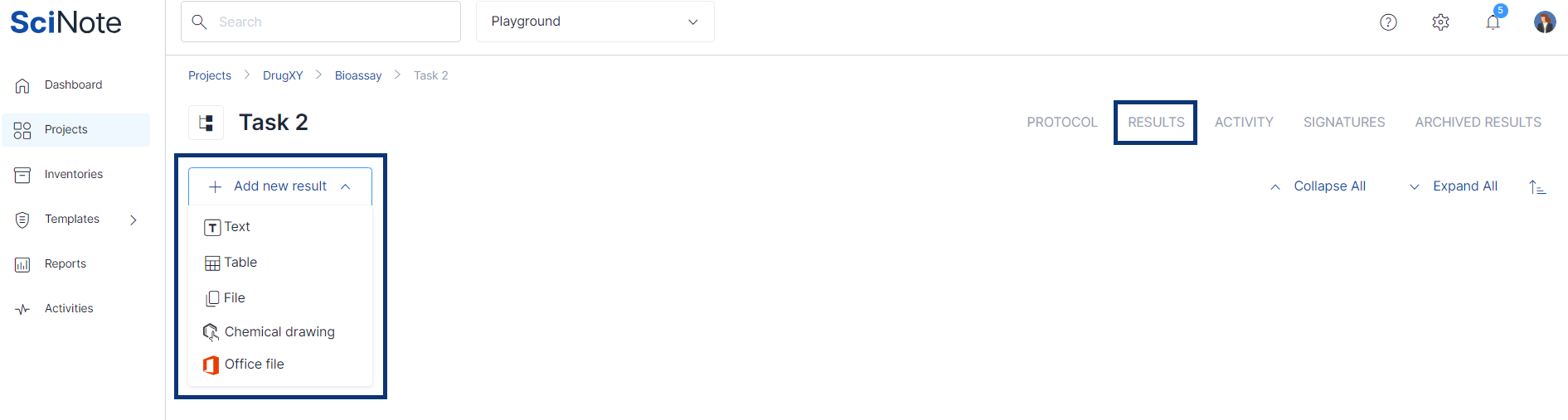
- Navigate to the Results tab inside the task.
- Click + New result.
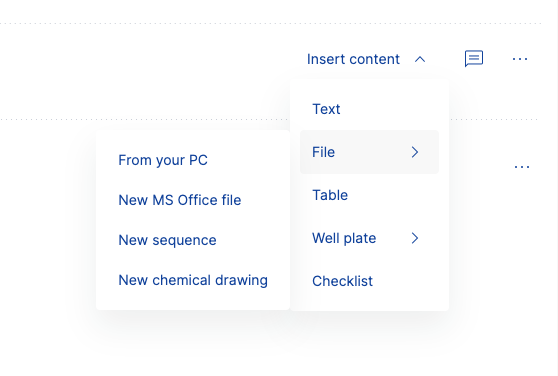
- Click Insert content in the result entry.
- Select the result type in the drop-down:
- Text (e.g. a sequence of base pairs of a plasmid vector)
- File (upload any file type, chemical drawing or sequence, or create a new Microsoft 365 file)
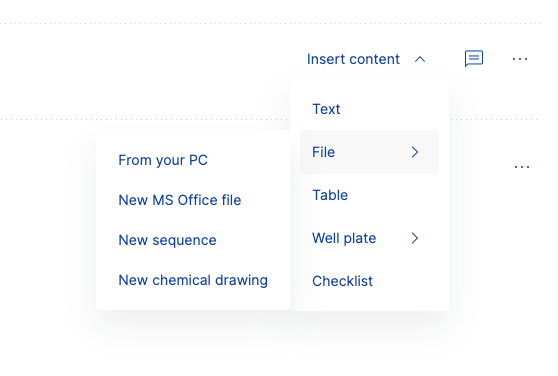
- Table (e.g. table of calculated solution concentrations)
- Well plate (choose the layout you need)
All results you upload are stored under the task and linked to the corresponding experiment and project.
Use the comments feature to tag colleagues or link other data using smart annotations. You can also edit or delete any result at any time by hovering over it and selecting the appropriate action. To learn more about smart annotations, read this article.
If you have any additional questions, please, do not hesitate to contact us at support@scinote.net. For more information about the Premium plans, please request a quote.