![SciNote_logo_color_2023.png]](https://knowledgebase.scinote.net/hs-fs/hubfs/SciNote_logo_color_2023.png?height=40&name=SciNote_logo_color_2023.png)
Create a protocol that includes only your result template and upload it into any new experiment (task). This lets you reuse a consistent results structure in just a few clicks.
To create a Results Template:
- Navigate to the Protocol Templates section in your SciNote workspace (left side menu).
- Select an existing protocol template or create a new one.
- Once inside the protocol template, you will now see an additional tab called Results, next to the Protocol tab.
- In the Results tab, you can:
- Add results entry fields (e.g. text entries, tables, images, attachments, etc.)
- Organize the structure just as you would in the Task section
- Publish the template after entering the desired layout
Just like protocol content, the results section becomes part of the template for reuse.
To use your Results Template in an Task:
- In the Task, click on Protocol Actions.
- Select Load from Templates.
- After selecting the template, you’ll see two options:
- Keep existing content: This adds to the task content alongside the current content.
- Overwrite: This removes current task content and replaces it entirely with the selected template content.
- Keep existing content: This adds to the task content alongside the current content.
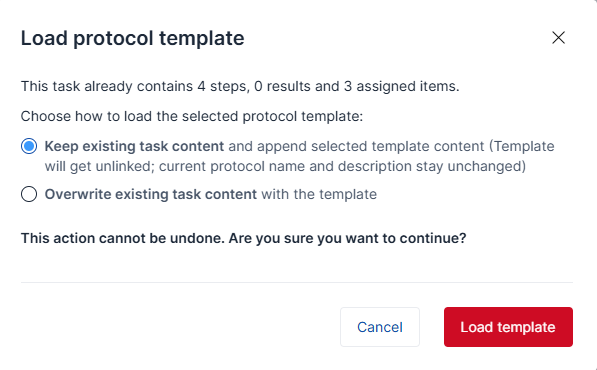
CAUTION: The option Keep existing content will unlink the task from the original protocol template.
If you have any additional questions, contact us at support@scinote.net. For more information about the Premium plans, please request a quote.